---
title: Approve or decline actions
description: How the assistant asks before it sends, deletes or changes something, and which actions need your approval.
---
The assistants can read and search on their own. Before they do something sensitive, such as sending an email or deleting a file, they stop and ask you. Nothing happens until you approve.
## What an approval looks like
When the assistant wants to take a sensitive action, an approval card appears in the conversation. The card has:
- A title that says what will happen, for example "Approve sending "Quarterly report" to sam@example.com from you@example.com".
- A one-line summary from the assistant of what it is about to do.
- Two buttons: **Approve** and **Decline**.
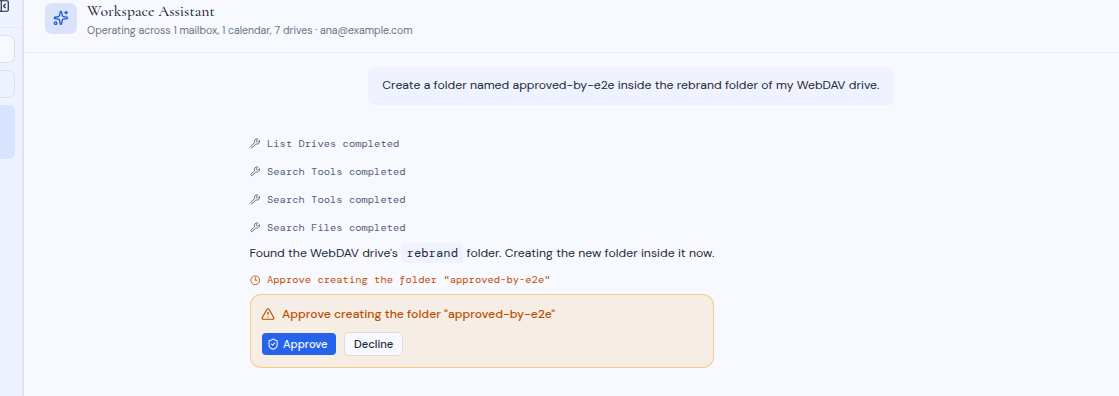
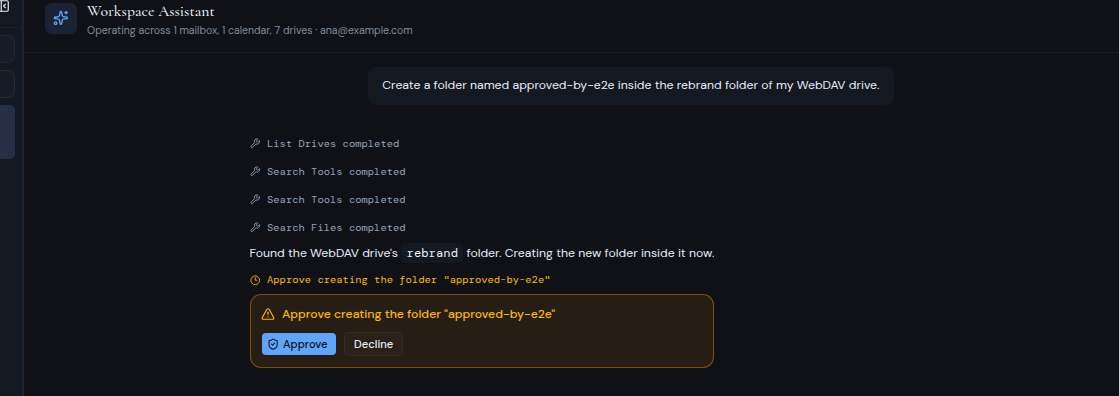 While it waits for you, the step reads "Approve this before it runs" or the card's own text.
To answer the card:
- **Approve:** the step shows "Approval submitted...", then the result. For example, a sent email shows "Sent "Quarterly report" to sam@example.com".
- **Decline:** the step shows "You declined" and nothing changes.
If a reply asks for more than one approval, answer each card. The assistant carries on by itself once you have answered all of them. If an approved step fails, the step shows the reason, or "That step didn't work".
## What needs approval
The Workspace Assistant asks before every action in this table. The side panels can do only some of these actions, and they ask in the same way:
- **Mail AI** asks only before deleting emails. It cannot send.
- **Calendar AI** asks before adding, changing or deleting events and before replying to invitations.
- **Drive AI** asks before creating folders, renaming, moving and deleting.
| Area | Action | The card says |
| --- | --- | --- |
| Mail | Delete emails | "Approve deleting 3 emails from you@example.com" |
| Mail | Send an email | "Approve sending "Subject" to someone@example.com from you@example.com" |
| Mail | Schedule an email | "Approve scheduling "Subject" to someone@example.com from you@example.com" |
| Mail | Call back a scheduled email | "Approve calling back this scheduled email" |
| Mail | Retry a scheduled email | Asks to retry the scheduled email, and notes that a send that already went out won't repeat |
| Mail | Unsubscribe from newsletters | "Approve unsubscribing from 2 senders for you@example.com" |
| Mail | Delete a label | "Approve deleting the label "Receipts"" |
| Mail | Delete a draft | "Approve deleting this draft from you@example.com" |
| Calendar | Add an event | "Approve adding "Team lunch" to your calendar" |
| Calendar | Change an event | "Approve changing "Team lunch"" |
| Calendar | Delete an event | "Approve deleting Team lunch" |
| Calendar | Reply to an invitation | "Approve replying "Yes" to this invite" (or "No", or "Maybe") |
| Drive | Create a folder | "Approve creating the folder "Invoices"" |
| Drive | Rename a file or folder | "Approve renaming this to "Invoices 2026"" |
| Drive | Move a file or folder | "Approve moving report.pdf" |
| Drive | Delete a file or folder | Asks to delete the item, and warns that it can't be undone |
| Drive | Pin a folder | "Approve pinning "Invoices"" |
| Drive | Unpin a folder | "Approve removing this folder pin" |
| Workflows | Create or change a workflow | "Approve creating the workflow "Name"" or "Approve changing the workflow "Name"" |
| Workflows | Turn a workflow on or off | "Approve turning this workflow on" or "Approve turning this workflow off" |
| Workflows | Delete a workflow | Asks to delete the workflow, and warns that it can't be undone |
| Workflows | Run a workflow now | Asks to run the workflow now, and warns that it can archive, delete, star or label matching emails |
| Workflows | Cancel a run | Asks to cancel the run, and warns that a step already in progress can't be called back |
| Workflows | Retry a run | Asks to retry the failed steps, and notes that completed steps won't run again |
| Workspace | Remove a member | Asks to remove the member, and warns that their mailboxes, calendars and drives leave the workspace |
| Workspace | Revoke an invitation | "Approve revoking this workspace invite" |
| Workspace | Change the accent color | "Approve changing the workspace accent color to blue for everyone" |
The names, addresses and numbers in the table are examples. Your card shows the real ones. The workspace actions are only available to workspace owners and admins.
When the assistant adds, changes or deletes an event, or replies to an invitation, the other attendees are notified as usual. Deleting a file in Google Drive or OneDrive moves it to that service's trash. On other drives, deleting removes the file for good.
## What runs without approval
The Workspace Assistant does these things straight away, because they are easy to undo or change nothing:
- Read, search and summarize anything it is allowed to read
- Mark as read or unread, star, archive and restore emails
- Set or clear labels, and create a new label
- Create or update a draft (the assistant says "Saved a draft", and nothing is sent)
- Snooze, unsnooze or cancel a snooze
- Mute or unmute a thread
- Add to or remove from Read later
## Approvals and MCP clients
Outside AI apps that you connect through MCP never show an approval card. Instead, sensitive actions are turned off for each client until you switch them on yourself. See [What an MCP client can do](/guide/assistant/what-an-mcp-client-can-do).
While it waits for you, the step reads "Approve this before it runs" or the card's own text.
To answer the card:
- **Approve:** the step shows "Approval submitted...", then the result. For example, a sent email shows "Sent "Quarterly report" to sam@example.com".
- **Decline:** the step shows "You declined" and nothing changes.
If a reply asks for more than one approval, answer each card. The assistant carries on by itself once you have answered all of them. If an approved step fails, the step shows the reason, or "That step didn't work".
## What needs approval
The Workspace Assistant asks before every action in this table. The side panels can do only some of these actions, and they ask in the same way:
- **Mail AI** asks only before deleting emails. It cannot send.
- **Calendar AI** asks before adding, changing or deleting events and before replying to invitations.
- **Drive AI** asks before creating folders, renaming, moving and deleting.
| Area | Action | The card says |
| --- | --- | --- |
| Mail | Delete emails | "Approve deleting 3 emails from you@example.com" |
| Mail | Send an email | "Approve sending "Subject" to someone@example.com from you@example.com" |
| Mail | Schedule an email | "Approve scheduling "Subject" to someone@example.com from you@example.com" |
| Mail | Call back a scheduled email | "Approve calling back this scheduled email" |
| Mail | Retry a scheduled email | Asks to retry the scheduled email, and notes that a send that already went out won't repeat |
| Mail | Unsubscribe from newsletters | "Approve unsubscribing from 2 senders for you@example.com" |
| Mail | Delete a label | "Approve deleting the label "Receipts"" |
| Mail | Delete a draft | "Approve deleting this draft from you@example.com" |
| Calendar | Add an event | "Approve adding "Team lunch" to your calendar" |
| Calendar | Change an event | "Approve changing "Team lunch"" |
| Calendar | Delete an event | "Approve deleting Team lunch" |
| Calendar | Reply to an invitation | "Approve replying "Yes" to this invite" (or "No", or "Maybe") |
| Drive | Create a folder | "Approve creating the folder "Invoices"" |
| Drive | Rename a file or folder | "Approve renaming this to "Invoices 2026"" |
| Drive | Move a file or folder | "Approve moving report.pdf" |
| Drive | Delete a file or folder | Asks to delete the item, and warns that it can't be undone |
| Drive | Pin a folder | "Approve pinning "Invoices"" |
| Drive | Unpin a folder | "Approve removing this folder pin" |
| Workflows | Create or change a workflow | "Approve creating the workflow "Name"" or "Approve changing the workflow "Name"" |
| Workflows | Turn a workflow on or off | "Approve turning this workflow on" or "Approve turning this workflow off" |
| Workflows | Delete a workflow | Asks to delete the workflow, and warns that it can't be undone |
| Workflows | Run a workflow now | Asks to run the workflow now, and warns that it can archive, delete, star or label matching emails |
| Workflows | Cancel a run | Asks to cancel the run, and warns that a step already in progress can't be called back |
| Workflows | Retry a run | Asks to retry the failed steps, and notes that completed steps won't run again |
| Workspace | Remove a member | Asks to remove the member, and warns that their mailboxes, calendars and drives leave the workspace |
| Workspace | Revoke an invitation | "Approve revoking this workspace invite" |
| Workspace | Change the accent color | "Approve changing the workspace accent color to blue for everyone" |
The names, addresses and numbers in the table are examples. Your card shows the real ones. The workspace actions are only available to workspace owners and admins.
When the assistant adds, changes or deletes an event, or replies to an invitation, the other attendees are notified as usual. Deleting a file in Google Drive or OneDrive moves it to that service's trash. On other drives, deleting removes the file for good.
## What runs without approval
The Workspace Assistant does these things straight away, because they are easy to undo or change nothing:
- Read, search and summarize anything it is allowed to read
- Mark as read or unread, star, archive and restore emails
- Set or clear labels, and create a new label
- Create or update a draft (the assistant says "Saved a draft", and nothing is sent)
- Snooze, unsnooze or cancel a snooze
- Mute or unmute a thread
- Add to or remove from Read later
## Approvals and MCP clients
Outside AI apps that you connect through MCP never show an approval card. Instead, sensitive actions are turned off for each client until you switch them on yourself. See [What an MCP client can do](/guide/assistant/what-an-mcp-client-can-do).