---
title: Download and open at the provider
description: Save a file to your computer, or open a file or folder in Google Drive or OneDrive.
---
You can download any file to your computer. For Google Drive and OneDrive, you can also open an item in the provider's own website.
## Download a file
1. Click the **...** button on the file, or right-click it.
2. Choose **Download**.
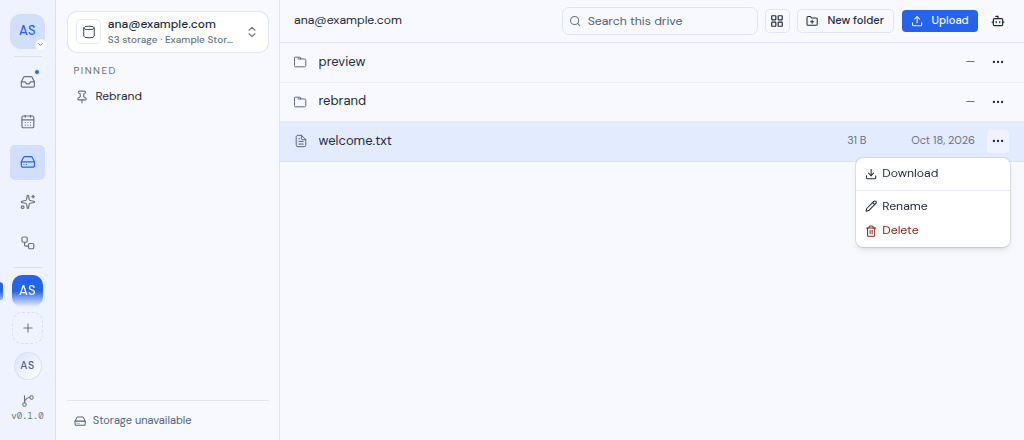
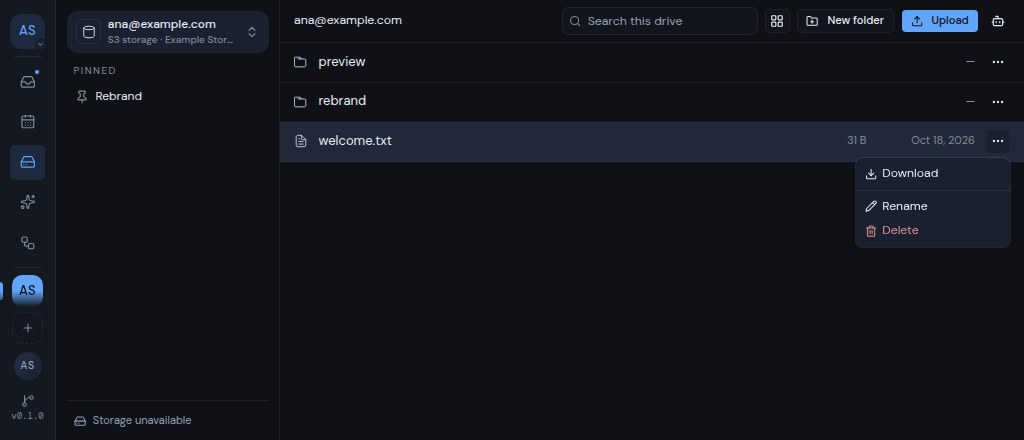 You can also click **Download** at the top of the [preview pane](/guide/drive/preview-files).
Only files can be downloaded. Folders have no **Download** action.
### Google Drive files
- Google Docs, Sheets, Slides and Drawings download as Word (.docx), Excel (.xlsx), PowerPoint (.pptx) and image (.png) files.
- A Google Drive download uses your browser's own Google sign-in. Your browser must be signed in to the same Google account as the drive.
## Open at the provider
For Google Drive and OneDrive, the actions menu also has **Open at provider**. It opens the file or folder on the provider's website in a new tab. The preview pane has the same choice as **Open in Google Drive** or **Open in OneDrive**.
Other drive types do not have this action.
## If a download fails
The reason shows as a short message at the bottom of the screen. Some messages have an **Open** button that opens the file at the provider instead.
| Message | What it means |
| --- | --- |
| "Folders cannot be downloaded" | Only files can be downloaded. |
| "Google does not offer this document in a downloadable format" | This kind of Google file cannot be downloaded. Use **Open** to view it in Google Drive. |
| "Google did not offer a download link for this file" | Google did not allow the download. Use **Open** to get it from Google Drive. |
| "OneDrive did not offer a download link for this file" | OneDrive did not allow the download. Use **Open** to get it from OneDrive. |
| "We couldn't find that." | The file no longer exists, or a [folder restriction](/guide/drive/folder-restrictions) hides it in this workspace. |
| "Files over N MB cannot be transferred for this drive" | Some drives send files through your Metis server, which has a size limit for them. Your administrator sets that limit. |
| "Too many transfers are running. Wait for one to finish" | Wait for one of your other transfers to finish, then try again. |
| "That file could not be downloaded" | Something else went wrong. Try again. |
You can also click **Download** at the top of the [preview pane](/guide/drive/preview-files).
Only files can be downloaded. Folders have no **Download** action.
### Google Drive files
- Google Docs, Sheets, Slides and Drawings download as Word (.docx), Excel (.xlsx), PowerPoint (.pptx) and image (.png) files.
- A Google Drive download uses your browser's own Google sign-in. Your browser must be signed in to the same Google account as the drive.
## Open at the provider
For Google Drive and OneDrive, the actions menu also has **Open at provider**. It opens the file or folder on the provider's website in a new tab. The preview pane has the same choice as **Open in Google Drive** or **Open in OneDrive**.
Other drive types do not have this action.
## If a download fails
The reason shows as a short message at the bottom of the screen. Some messages have an **Open** button that opens the file at the provider instead.
| Message | What it means |
| --- | --- |
| "Folders cannot be downloaded" | Only files can be downloaded. |
| "Google does not offer this document in a downloadable format" | This kind of Google file cannot be downloaded. Use **Open** to view it in Google Drive. |
| "Google did not offer a download link for this file" | Google did not allow the download. Use **Open** to get it from Google Drive. |
| "OneDrive did not offer a download link for this file" | OneDrive did not allow the download. Use **Open** to get it from OneDrive. |
| "We couldn't find that." | The file no longer exists, or a [folder restriction](/guide/drive/folder-restrictions) hides it in this workspace. |
| "Files over N MB cannot be transferred for this drive" | Some drives send files through your Metis server, which has a size limit for them. Your administrator sets that limit. |
| "Too many transfers are running. Wait for one to finish" | Wait for one of your other transfers to finish, then try again. |
| "That file could not be downloaded" | Something else went wrong. Try again. |