---
title: Troubleshooting
description: What the dashboard's deploy checks and warnings mean, and how to fix the most common problems.
---
Start in the owner dashboard. The deploy check bar at the bottom of the sidebar shows whether the last deploy found problems, and the **System** page shows warnings above its cards.
## Read the deploy checks
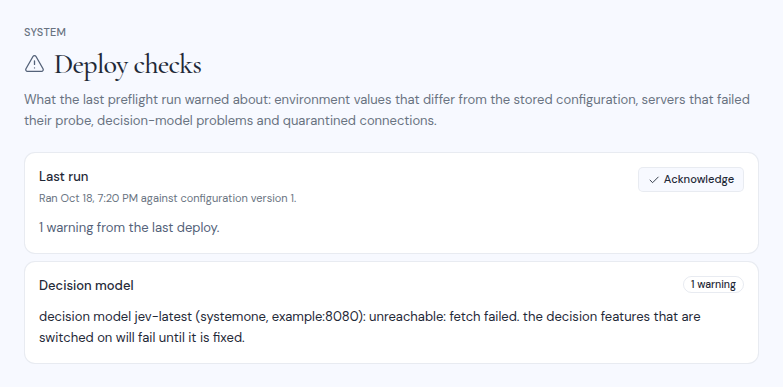
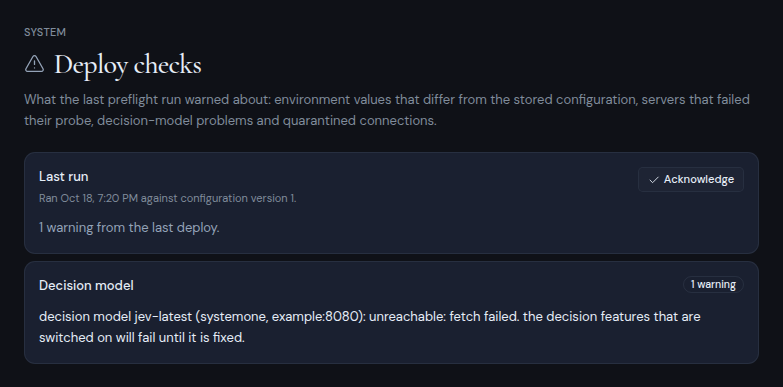
Every deploy runs preflight, which checks your settings and servers and records what it found. Click the deploy check bar to open the **Deploy checks** page.
- The **Last run** card says when preflight ran and against which configuration version. Its badge reads **No warnings**, or offers an **Acknowledge** button.
- Clicking **Acknowledge** clears the highlight on the sidebar bar. It does not fix anything, and the next deploy records a new run.
- If the configuration changed after that run, a note says that some warnings may no longer apply. The next deploy checks again.
- Before the first deploy, the page shows **No preflight run yet**.
 Warnings are grouped as follows.
| Group | What it means | What to do |
| --- | --- | --- |
| **Seeding** | The first stored settings have a problem. For example, no provider is configured, or the `internal` runner was stored on a host that suspends the app. | Fix the setting under **System**. |
| **Environment differs from the stored config** | A setting in the environment or the config file differs from the one stored in the dashboard. The stored value is used. | Change the setting in the dashboard, or remove it from the environment. |
| **Server checks** | A server in your lists, or an OAuth client, failed its check. People cannot connect through it until it is fixed. | Open the provider page under **System**, fix the entry and click **Run check**. |
| **Decision model** | The decision model is missing an API key, rejected the key, could not be reached, or does not offer the model. | Fix the `METIS_DECISION_*` variables and restart. See [AI models](/self-hosting/configure/ai-models#add-a-decision-model-optional). |
| **Quarantine** | Some connections were hidden because their provider or server is no longer configured. | They come back when you configure the provider again, or restore the removed server entry from **History**. Users can also delete those connections. |
## Common problems
### Nobody can connect an account
The **System** page says "No provider is configured, so no mailbox, calendar or drive can be connected until one is added under Dashboard → System." Add a provider. See [Sign-in providers](/self-hosting/configure/sign-in-providers) and [Server lists](/self-hosting/configure/server-lists).
### Connecting a Google, Microsoft or Zoho account fails
Check that the redirect URI registered with the provider matches the **Redirect URI** on the provider's page exactly. It changes when your domain changes. Then click **Run check** on the provider page: it tells a wrong client ID or secret apart from other problems.
### Accounts disappeared from every workspace
Their provider or server entry was removed, so they are quarantined. The **Connections** page lists them. They come back when you configure the provider again, or restore the removed server entry from **History**.
### Sign-in links and invitations never arrive
The **Mail** card on the **System** page shows **Console only** or **Not delivered**. Set up Resend or SMTP. See [Outgoing email](/self-hosting/configure/outgoing-email).
### Scheduled mail and workflows do not run
Open **Automation**. If the status is **No tick yet** or **Delayed**, the workflow runner is not being woken. See [Background work](/self-hosting/configure/background-work).
### AI features are missing
The **LLM** card on the **System** page shows **Off**. Set up a model. See [AI models](/self-hosting/configure/ai-models). People can also turn AI off for their own workspaces and mailboxes.
### The app does not start after a change to .env
A setting has a wrong value. The app refuses to start and names the setting. Read the preflight log:
```bash
sudo docker compose --project-directory /opt/metis-suite logs preflight
```
### The owner dashboard is missing
Only the account whose email matches `METIS_OWNER_EMAIL` sees **Dashboard** in the user menu. If no owner email is set, nobody does. Set it in `.env` and restart the app. See [First run](/self-hosting/install/first-run).
### Saving a setting fails
| Message | What to do |
| --- | --- |
| **Check failed**, "Nothing was saved." | A setting did not pass its check against the real service. Fix the fields shown and save again. |
| "Invalid authenticator or backup code" | Enter a fresh code from your authenticator app, or a backup code. |
| "Too many attempts. Please slow down." | Wait a few minutes. You can try 10 codes every 5 minutes. |
| "The configuration changed since you opened it" | Someone saved a change while you were editing. Reload the page and try again. |
Warnings are grouped as follows.
| Group | What it means | What to do |
| --- | --- | --- |
| **Seeding** | The first stored settings have a problem. For example, no provider is configured, or the `internal` runner was stored on a host that suspends the app. | Fix the setting under **System**. |
| **Environment differs from the stored config** | A setting in the environment or the config file differs from the one stored in the dashboard. The stored value is used. | Change the setting in the dashboard, or remove it from the environment. |
| **Server checks** | A server in your lists, or an OAuth client, failed its check. People cannot connect through it until it is fixed. | Open the provider page under **System**, fix the entry and click **Run check**. |
| **Decision model** | The decision model is missing an API key, rejected the key, could not be reached, or does not offer the model. | Fix the `METIS_DECISION_*` variables and restart. See [AI models](/self-hosting/configure/ai-models#add-a-decision-model-optional). |
| **Quarantine** | Some connections were hidden because their provider or server is no longer configured. | They come back when you configure the provider again, or restore the removed server entry from **History**. Users can also delete those connections. |
## Common problems
### Nobody can connect an account
The **System** page says "No provider is configured, so no mailbox, calendar or drive can be connected until one is added under Dashboard → System." Add a provider. See [Sign-in providers](/self-hosting/configure/sign-in-providers) and [Server lists](/self-hosting/configure/server-lists).
### Connecting a Google, Microsoft or Zoho account fails
Check that the redirect URI registered with the provider matches the **Redirect URI** on the provider's page exactly. It changes when your domain changes. Then click **Run check** on the provider page: it tells a wrong client ID or secret apart from other problems.
### Accounts disappeared from every workspace
Their provider or server entry was removed, so they are quarantined. The **Connections** page lists them. They come back when you configure the provider again, or restore the removed server entry from **History**.
### Sign-in links and invitations never arrive
The **Mail** card on the **System** page shows **Console only** or **Not delivered**. Set up Resend or SMTP. See [Outgoing email](/self-hosting/configure/outgoing-email).
### Scheduled mail and workflows do not run
Open **Automation**. If the status is **No tick yet** or **Delayed**, the workflow runner is not being woken. See [Background work](/self-hosting/configure/background-work).
### AI features are missing
The **LLM** card on the **System** page shows **Off**. Set up a model. See [AI models](/self-hosting/configure/ai-models). People can also turn AI off for their own workspaces and mailboxes.
### The app does not start after a change to .env
A setting has a wrong value. The app refuses to start and names the setting. Read the preflight log:
```bash
sudo docker compose --project-directory /opt/metis-suite logs preflight
```
### The owner dashboard is missing
Only the account whose email matches `METIS_OWNER_EMAIL` sees **Dashboard** in the user menu. If no owner email is set, nobody does. Set it in `.env` and restart the app. See [First run](/self-hosting/install/first-run).
### Saving a setting fails
| Message | What to do |
| --- | --- |
| **Check failed**, "Nothing was saved." | A setting did not pass its check against the real service. Fix the fields shown and save again. |
| "Invalid authenticator or backup code" | Enter a fresh code from your authenticator app, or a backup code. |
| "Too many attempts. Please slow down." | Wait a few minutes. You can try 10 codes every 5 minutes. |
| "The configuration changed since you opened it" | Someone saved a change while you were editing. Reload the page and try again. |