Privacy and safety when reading
How Metis Suite blocks remote images and trackers, cleans links, and keeps messages in a safe view.
Many emails try to learn when, where and how often you open them. Metis Suite stops most of this before the message reaches your screen. This page explains what you see and what you can change.
These choices are personal. They follow you across every mailbox and workspace, and changing them never affects anyone else who shares a mailbox.
Messages open in a safe view
Every message opens in an isolated view:
- Scripts and forms in the message do not run.
- Fonts, style sheets, videos, sounds and embedded pages from the internet never load. Only images can be loaded, and only when you choose (see below).
- Links open in a new browser tab. In the desktop and mobile apps, they open in your system browser.
- Your keyboard shortcuts keep working after you click inside a message.
Messages follow the app’s light or dark theme. A message that was not designed for dark mode stays on a white page so it remains readable. Plain-text messages show as plain text.
Remote images are blocked
Images stored on the sender’s server can tell the sender when and where you opened the message. So Metis Suite blocks them until you say otherwise. A banner above the message says how many images were blocked, for example “3 remote images blocked”.


The banner has three buttons:
| Button | What it does |
|---|---|
| Load images | Loads the images in this message only. After you reload the page, they are blocked again. |
| Always from (the sender’s address) | Always loads images from this sender. |
| Always from (the sender’s domain) | Always loads images from this domain and its subdomains. |
You can also click an image placeholder in the message to load the images.
If the banner also says “They load through this server, which hides your address but not the open itself.”, your instance fetches images for you. The sender then cannot see your internet address or device, but can still tell the message was opened.
If saving a choice fails, you see “Could not save that choice”. Try again.
Trackers are removed
Some emails hide tiny tracking images or links. Metis Suite removes known trackers before the message is shown, whatever your image settings. They are also removed from the quoted text when you reply or forward.
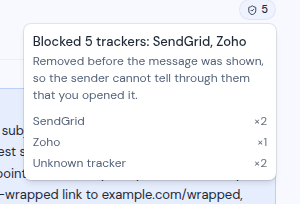
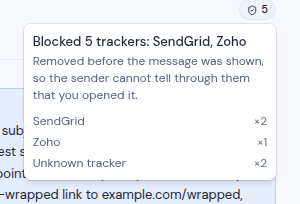
When trackers were removed, a green shield with a number appears under the date. Click it to see the list of trackers by name, or “Unknown tracker” when the name is not known.
Links are cleaned
Many links carry tracking codes, or pass through a tracking service before they reach the real page. Metis Suite removes tracking codes from links. When the real destination can be read from the link itself, it opens that destination directly. Metis Suite never visits a link to find out where it goes.
Links in summary cards are cleaned the same way.
Point at a link to see where it goes. A note at the bottom left of the message shows one of:
- “Opens” followed by the web address
- “Writes to” followed by the email address, for email links
- “Tracked by” a named service, or “Tracked by an unknown service”, when the real destination cannot be read from the link
Change your privacy settings
You can change these choices in your account settings, under Privacy:
- Load remote images automatically (off by default)
- Clean tracking from links (on by default). If a cleaned link stops working, turn this off.
- Senders whose images always load: the senders and domains you trusted, which you can remove here.
See Your account for the full settings page.
Limits
- Images embedded inside the message itself (inline images) do not display.
- Trackers served from the sender’s own web address may not be named in the tracker list. Blocking remote images still stops them.
- A few kinds of wrapped links cannot be unwrapped. Metis Suite marks them as tracked instead.